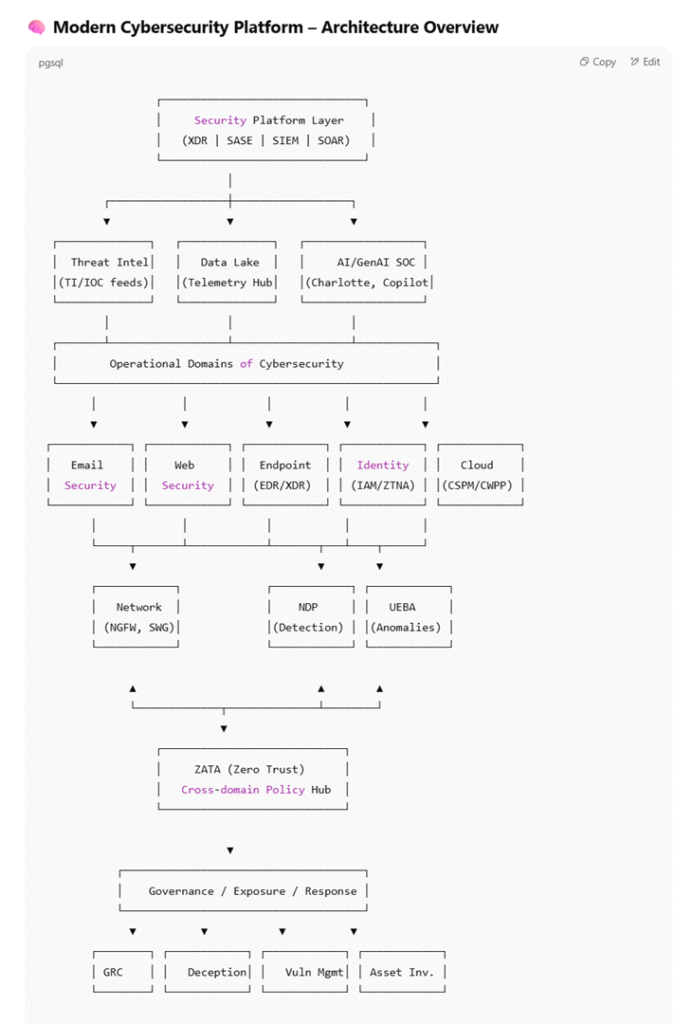
In today’s interconnected and cloud-driven environments, cybersecurity is no longer just about firewalls and antivirus software. Modern threats come from everywhere: phishing, insider risks, software backdoors, misconfigurations, credential leaks, and more. A robust cybersecurity architecture must therefore be layered, intelligent, adaptive, and integrated.
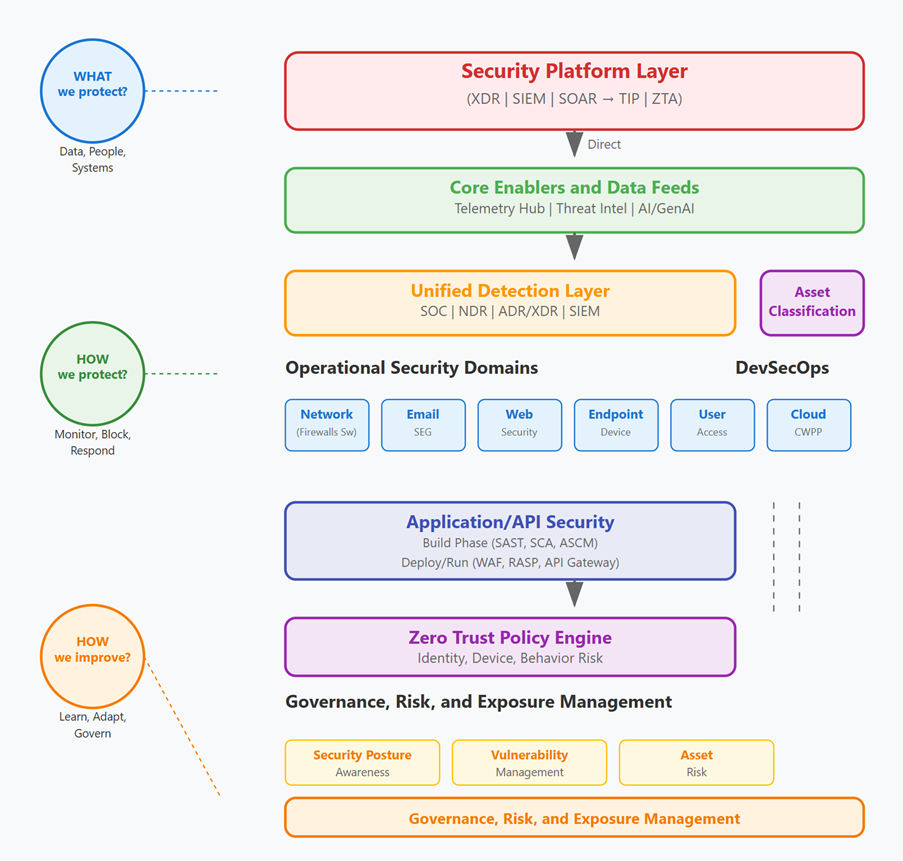
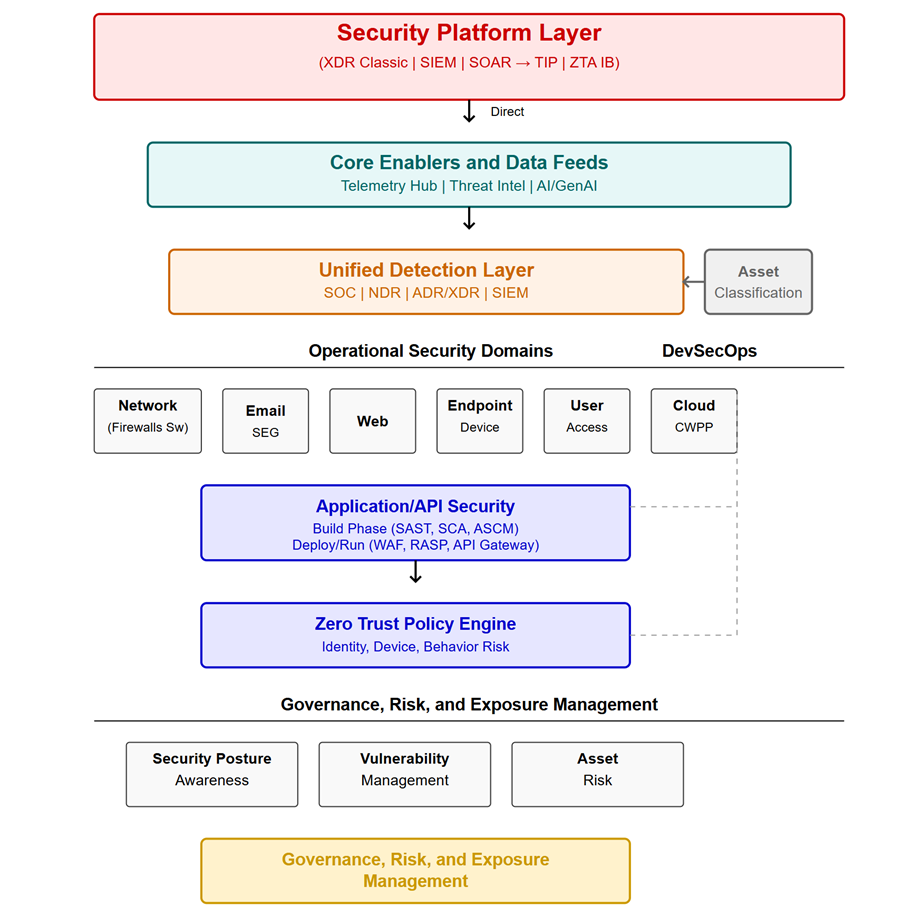
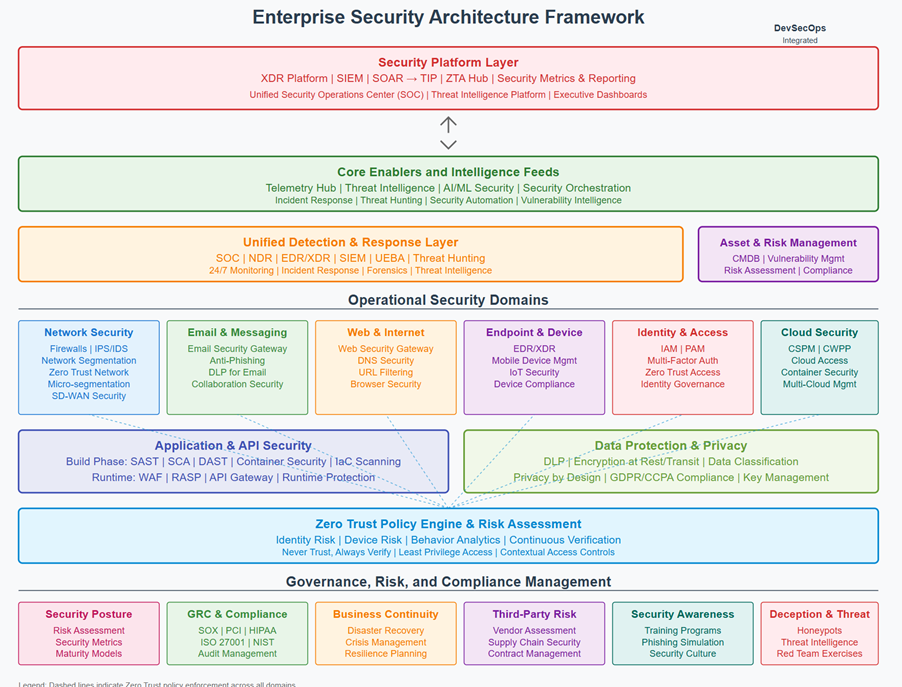
The diagram above presents a modern enterprise security architecture. Let’s walk through it from top to bottom, explaining how it protects the business end-to-end.
In today’s world, organizations face advanced, multi-channel cyber threats — from phishing and ransomware to cloud misconfigurations and insider abuse.
A fragmented or siloed defense is no longer enough.
This architecture defines a modern, unified cybersecurity framework to:
- Detect and respond to threats across every layer of the organization.
- Build resilience through automation, visibility, and policy enforcement.
- Ensure compliance and governance through structured risk management.
It’s not just about tools — it’s about how all components work together as a platform.
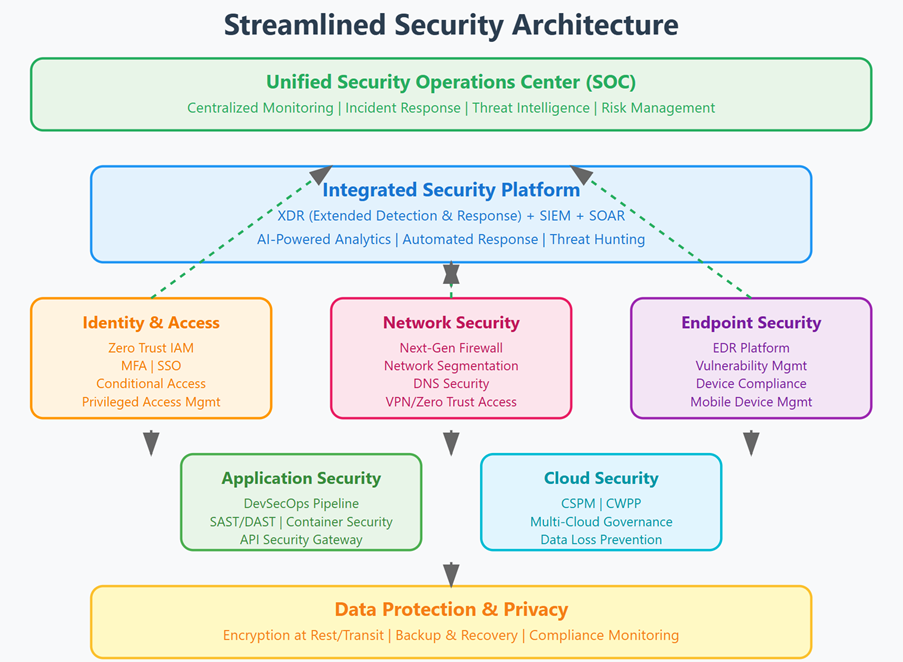
This diagram provides a layered architecture of a modern cybersecurity platform, showcasing how various components and domains interconnect to build an integrated cyber defense system.
This cybersecurity architecture is our blueprint for defending against today’s and tomorrow’s threats. It brings together intelligence, automation, policy enforcement, and governance into a single cohesive framework.
This layered cybersecurity architecture ensures:
✅ Threats are detected early, not after damage is done
✅ All systems share context, improving accuracy and speed
✅ Security is automated, policy-driven, and behavior-aware
✅ You can scale securely, even in cloud and hybrid environments
✅ Risk and compliance are baked in, not bolted on
Current flow makes sense from a data perspective:
- Security Platform Layer (strategic command/control)
- Core Enablers (data collection and intelligence)
- Unified Detection Layer (analysis and correlation)
- Operational Security Domains (implementation)
Security Platform Layer: The Control Tower
At the top sits the security platform — the brain of the entire system. It doesn’t detect threats directly but instead acts as the coordinator and decision-maker. It brings together data from across the organization, prioritizes what matters, and orchestrates automated responses.
Key responsibilities:
- Provides a central dashboard for alerts and visibility
- Connects all security tools and processes
- Automates decisions (e.g., block access, isolate a device)
- Applies consistent policies across cloud, endpoints, and users
📌 Why it matters: This layer helps security teams move quickly, removes manual work, and ensures no threat falls through the cracks.
“The control tower of cybersecurity”
This is the unifying orchestration layer that integrates signals across domains
| Command and Control — Manages, orchestrates, and automates the entire security system |
These systems ingest, correlate, and orchestrate alerts and telemetry across all environments.
“This is our cybersecurity ‘brain’ — where we consolidate insights, automate workflows, and apply advanced threat detection.”
This layer enables real-time threat detection, fast decision-making, and automated containment — all from a central place.
- XDR (Extended Detection and Response): Correlates data from endpoints, networks, cloud, etc., for unified detection and response. Unifies detection across endpoints, networks, cloud, and identity. Extended Detection and Response (XDR) Platform: Think of this as a sophisticated monitoring system that watches all areas of your digital environment simultaneously, correlating events across different systems to identify threats that might otherwise go unnoticed.
- SASE (Secure Access Service Edge): Combines networking (SD-WAN) with security (ZTNA, FWaaS, CASB).
- SIEM (Security Information & Event Management): Centralized log analysis and threat detection. Collects and correlates logs from every system. This combination provides real-time analysis of security alerts and automates many response actions, allowing security teams to focus on strategic threats rather than routine tasks.
- SOAR (Security Orchestration, Automation & Response): Automates threat response workflows.
- TIP (Threat Intelligence Platform): Integrates real-time intelligence from the wider cyber threat landscape. This system continuously gathers and analyzes information about emerging threats, helping the organization stay ahead of attackers by understanding their tactics and targets.
- ZTA Hub (Zero Trust Architecture): Centralized policy broker to enforce least privilege and identity-based access control. This ensures that no user or device is automatically trusted, regardless of their location or previous access history.
Think of this as Mission Control. It doesn’t do the actual work of detecting or protecting directly — instead, it connects all the tools, brings all the signals together, and coordinates responses.
- It pulls in data from all parts of the organization (email, network, cloud, apps, etc.)
- It automates responses, like cutting off a suspicious login or alerting security
- It gives a single view of security risks across the business
Step 2: Make sense of it and act → Security Platform Layer
- It correlates data (e.g. “User A logged in from Nigeria + downloaded sensitive files”).
- It orchestrates across tools (“If this happens, then block access + notify analyst”).
- It centralizes everything in one view (dashboard, SIEM, or XDR console).
- It triggers automated workflows (via SOAR or Zero Trust enforcement).
Layer: Security Platform Layer
Role: The Control Tower
This layer acts like a central command center for all cybersecurity activity. It doesn’t scan or detect threats directly — instead, it brings together all signals, coordinates actions, and automates responses.
Key functions:
- Combines alerts and data from across systems (email, cloud, endpoints, etc.)
- Provides a single dashboard for visibility and investigation
- Automates response to incidents (e.g., blocks a suspicious login or locks a compromised device)
- Enforces security policies across the organization
📌 Why it matters: This layer helps security teams respond faster, reduces manual work, and ensures consistent action across the business.
Unified Detection Layer: The Radar and Intelligence Engine
Just below the platform sits the detection layer, which is responsible for spotting suspicious activity — early and accurately.
It receives raw data (like login patterns, file access, network behavior) and analyzes it using rules, machine learning, and behavior baselines to identify:
- Unusual access (e.g., login from another country)
- Abnormal file activity (e.g., mass downloads)
- Malware, phishing, or lateral movement attempts
When a threat is found, this layer alerts the platform above to take action.
📌 Why it matters: It reduces false alarms and allows real issues to be flagged quickly.
———————————————————————————————–
Our eyes and ears
Where signals become security alerts
Detects ransomware, phishing, privilege escalation, lateral movement, etc. across the organization — early and accurately.
Includes SOC, NDR, ADR/XDR, SIEM
SOC (Security Operations Center): Monitors and investigates alerts.
NDR (Network Detection & Response): Looks for suspicious patterns across the network.
EDR/XDR: Detects and responds to endpoint-based threats.
SIEM (again): Works here as the log correlation engine.
Asset Classification: Helps prioritize alerts by knowing what’s critical vs. non-critical. Asset Classification – so we know what is affected and how critical it is.
Detects anomalies, intrusions, malicious behavior.
This is where we detect threats in motion — across the network, endpoints, cloud, and users — before they become business-impacting breaches
🟠 Step 3: Threat Detection
Layer: Unified Detection Layer
Role: The Brain
This is the decision-making layer. It receives the raw data from the previous layer and analyzes it to detect risks and suspicious activity.
It looks for:
- Unusual user behavior (e.g., logging in from a strange location)
- Abnormal patterns (e.g., mass downloads or logins at odd hours)
- Signs of malware or unauthorized access
If something looks wrong, this layer raises the alarm to the platform layer above.
📌 Why it matters: This layer separates the signal from the noise. It finds problems early and accurately, so action can be taken quickly.
The Unified Detection Layer could logically be second because:
- It’s the primary “engine” that processes threats
- It directly supports the Security Platform Layer’s decision-making
- It orchestrates responses across the operational domains
Core Enablers and Data Feeds. The Eyes and Ears
This layer collects and feeds raw data and context into the system. It includes logs, metrics, user behavior, device health, and external threat intelligence.
Sources include:
- Email, endpoint, cloud activity
- Known hacker behavior or malware indicators
- AI tools that enrich and summarize large volumes of data
It does not make security decisions — it simply provides the signal that powers detection above.
📌 Why it matters: Without visibility, you can’t protect. This layer enables security awareness across the enterprise.
——————————————————————————————————–
Intelligence & Data Core. This feeds into the Platform Layer
Our foundation for intelligence
Raw Inputs — Collects, stores, and enriches telemetry and threat intelligence
The raw input powering intelligent decisions.
Turns noisy data into actionable insight — enabling proactive defense and accelerated triage.
This layer collects telemetry (data) from across the enterprise and enriches it with threat intelligence and AI analysis.
Why it matters: Security teams can focus on the real threats, not get buried in noise.
This layer supplies all the raw data the system needs to make decisions — from inside and outside the company.
It includes:
- Telemetry Hub: Collects real-time data from devices, users, applications, and systems
- Threat Intelligence: Brings in insights from the outside world (e.g., known hacker activity, blacklisted IPs)
- AI / GenAI: Helps make sense of massive data quickly — summarizing patterns, highlighting threats, or automating reports
Just below the command layer, the architecture collects and enriches raw data from across the business — from laptops, servers, cloud apps, and user accounts.
- Threat Intel: Provides threat context for detection engines; understands emerging attacker behavior
- Data Lake / Telemetry Hub. Aggregates security telemetry across systems (logs, flows, events). Supports analytics, ML models, threat hunting. collects data from across the enterprise
- AI/GenAI SOC. AI-driven SOC tools like Copilot or Charlotte for 1) Automated triage 2) SOC analyst augmentation 3) GenAI-assisted investigations. assists in analysis, correlation, and decision-making
Layer: Core Enablers and Data Feeds
Role: The Eyes and Ears
This layer is responsible for collecting the raw signals the system needs to function. It brings in both internal data (from company systems) and external intelligence (from the wider threat landscape).
Sources include:
- Logs from laptops, cloud apps, email servers, and internal networks
- External alerts (e.g., newly discovered threats or risky websites)
- AI tools that summarize and prioritize large volumes of activity
📌 Why it matters: Just like a factory needs sensors to spot problems early, cybersecurity needs visibility to work. This layer gives the system its awareness — but doesn’t yet act on it.
Step 1: Collect the data → Core Enablers (Data Lake, Threat Intel, Telemetry)
- This is where logs, metrics, and real-time signals from email, cloud, endpoint, etc. are ingested.
- Also includes external data, like threat feeds and GenAI insights.
- It’s mostly passive — storing and feeding data upward.
🧠 What it doesn’t do: Prioritize alerts, correlate across systems, or trigger actions.
| Step | Layer | Purpose |
| Step 1 | 🟢 Core Enablers & Data Feeds | Collect the raw data from inside and outside the organization. Includes logs, threat feeds, telemetry, AI enrichment. 📌 This layer “watches” and stores. Collects login logs, device data, threat intel showing Nigerian IPs used in attacks Feed the system data — but don’t judge it |
| Step 1.5 | 🟠 Unified Detection Layer | Analyzes the raw data: detects threats, identifies patterns, flags anomalies. Uses rules, models, or baselines to decide: “Is something wrong?” 📌 This layer “thinks.” Sees that a user logged in from Nigeria at 3am, which breaks behavioral pattern. Flags this as anomaly Analyzes and identifies what looks like a threat |
| Step 2 | 🔺 Security Platform Layer | Acts on alerts from the Detection Layer. It orchestrates workflows, automates decisions, and manages dashboards. 📌 This layer “responds.” Triggers action: disables account, alerts analyst, blocks IP, logs incident in dashboard Decides what to do about it and executes the response |
Core Enablers = Collect and forward signals
Detection Layer = Analyze those signals to find threats
Security Platform = Act on what the Detection Layer discovers
the data flow works like an inverted pyramid:
🔃 From bottom to top:
- Raw data (telemetry) flows upward
- Detection identifies issues
- Platform responds and controls
- End-user systems (email, cloud, network) are protected via those actions
🧱 **The pyramid is not a data flow model — it’s a functional stack.
📌 Why it’s drawn as a pyramid:
| Visual Design Purpose | Explanation |
| Top = Strategic control layer | The Security Platform sits at the top because it has full visibility and drives orchestration across everything below. |
| Middle = Operational layers | Detection and protection functions are in the middle — the “engine room” of cybersecurity. |
| Bottom = Foundational support | Governance, posture management, asset inventory, and compliance sit at the base because they support everything else (like risk scoring, auditability, etc.) |
So while data flows upward (bottom → top), authority and control flow downward (top → bottom).
Data flows up (Enablers → Detection → Platform)
Decisions and actions flow down (Platform → Enforcement on endpoints, cloud, users, etc.)
Operational Domains of Cybersecurity
Our defense lines — across every digital surface.
These are the layers where we enforce controls: stopping phishing, containing malware, and securing users, data, and cloud environments.”
Each domain blocks threats at its source and shares context with the rest of the platform.
Each domain focuses on protecting a different surface area of the enterprise.
These are core areas where security controls are applied:
- Email Security. Filters spam, phishing, malware. Examples: Proofpoint, Mimecast.
- Web Security. Protects against web-based threats (malicious URLs, downloads). Often integrated with proxies or secure browsers.
- Endpoint Security. EDR/XDR agents for detection and remediation. Vendors: CrowdStrike, SentinelOne.
- Identity Security. IAM (Identity & Access Management), ZTNA (Zero Trust Network Access). Controls user authentication and privilege.
- Cloud Security. CSPM (Cloud Security Posture Management), CWPP (Cloud Workload Protection Platform). Enforces policies on cloud environments (AWS, Azure, GCP).
Layer: Operational Security Domains
Role: The Front Lines
This is where actual protection is applied — across every major part of your digital environment. Each domain has tools and controls to stop threats at the source.
| Area | What It Protects |
| Network | Firewalls that block risky internet activity |
| Filtering out phishing and spam | |
| Web | Preventing access to malicious websites |
| Devices | Stopping malware and keeping laptops secure |
| Cloud | Managing security settings in tools like Microsoft 365 or AWS |
📌 Why it matters: These are your digital “entry points.” Each one needs its own layer of defense — and they all feed into the detection and control systems above.
Application & API Security
Where security meets software.
Protecting code — before and after it’s deployed
As businesses develop software and connect to third-party tools, they expose new attack surfaces. This layer ensures that:
- Software code is scanned before release
- Interfaces (APIs) are protected from misuse
- Security is built into apps from development to launch
💡 Why it matters: Prevents data leaks, downtime, and reputational damage from vulnerable apps.
Role: Securing Your Software
If your business builds or uses software, you need protection during both:
- Development (scanning code for issues before launch)
- Operation (protecting applications and APIs from misuse or attacks)
📌 Why it matters: Whether you’re offering services online or connecting to external systems, this layer ensures that your software doesn’t become a gateway for attackers.
Our applications and APIs are business-critical — this layer ensures we secure them at every stage of their lifecycle.
- Build Phase → SAST (code scanning), SCA (dependency scanning), ASCM (configuration)
- Deploy/Run Phase → WAF, RASP, API Gateways
ZATA (Zero Trust Architecture)
No implicit trust — verify everything, always. We ensure that only the right people, using trusted devices, get access — and only to what they need.”
Zero Trust replaces the outdated “trust the network” mindset with continuous validation.
Controls access based on 1) User Identity 2) Device Posture 3) Behavioral Risk
If something seems suspicious (e.g., user logging in from Russia at 3am), access is blocked or challenged — even if the password is correct.
🧠 Business Value: Stops credential theft, insider misuse, and privilege abuse through smart access enforcement.
Improves audit readiness, supports resilience, and enables faster response with lower risk.
Layer: Zero Trust Policy Engine
Role: The Gatekeeper
This layer ensures that no one gets access just because they’re inside the company network. Instead, access is based on:
- The person’s identity
- The device they’re using
- Their behavior
If something seems off (e.g., logging in from a new country at 2AM), the system can block access or require additional verification.
📌 Why it matters: It prevents attackers from moving freely, even if they’ve stolen someone’s password.
Governance / Exposure / Response. This layer focuses on control, compliance, and risk reduction.
Govern, adapt, and learn.
Identifying risk, ensuring compliance, and building cyber resilience.
Layer: Governance, Risk, and Exposure Management
Role: The Oversight Function
This final layer helps the business:
- Monitor its overall risk
- Track security posture over time
- Simulate attacks using decoys or test environments
- Ensure compliance with regulations (like ISO 27001, GDPR, etc.)
- Manage third-party risk and conduct audits
📌 Why it matters: Security isn’t just about stopping attacks — it’s about proving you’re in control, prepared for crises, and operating responsibly.
Executive Phishing Email (Business Email Compromise)
Give a real life phising example and how this is cohesive
A senior executive receives an email that. Appears to be from the CFO. Says: “We’re closing a confidential M&A deal. Please review and approve this urgent wire.” Contains a malicious link or a fake DocuSign login
Operational Security Domains
- Email SEG (Secure Email Gateway) — First line of defense
- Flags suspicious sender domain that’s slightly off (e.g., cf0-company.com)
- Scans the link for malware or phishing using URL sandboxing
- Blocks or quarantines the email (or tags it as suspicious)
If the SEG misses it:
- Unified Detection Layer
XDR/EDR/UEBA + SIEM
- XDR detects abnormal user behavior:
- Executive clicks a link and suddenly accesses an external login page from a new browser.
- UEBA flags that this is not usual behavior for the executive
- SIEM correlates that this domain is newly registered + has malicious reputation
➡️ Automatically escalates to the Security Operations Center (SOC)
- Core Enablers and Data Feeds
Threat Intel + AI/GenAI
- Threat Intelligence platform confirms this attack is part of a known phishing campaign targeting finance executives in M&A departments
- GenAI Copilot helps the SOC rapidly triage and summarize the phishing tactic
- AI/ML matches the sender’s tactics to prior phishing campaigns (e.g., Russian or Nigerian cybercrime syndicates)
- Security Platform Layer
SOAR + SIEM + TIP
- SOAR kicks off an automated response playbook:
- Notifies user
- Forces logout from all sessions
- Blocks malicious domain at proxy and firewall
- Isolates endpoint if needed
- Updates email SEG and firewall rules globally
- Logs and indicators are shared with other tools via TIP (Threat Intel Platform)
Application/API Security
- If the phishing attempt tries to access internal web apps via a spoofed SSO:
- WAF/API Gateway detects malformed login attempts
- Blocks access or enforces additional verification
Zero Trust Policy Engine
- Behavioral and Risk-Based Access Control
- Policy engine notices behavioral anomaly:
- High-risk login attempt from a device never used before
- Enforces step-up authentication or denies access
Governance, Risk, and Exposure Management
- Security Awareness Training is triggered for the user (if they clicked)
- GRC team logs the incident for compliance and regulatory reporting
- Vulnerability Management ensures no device-level exploit occurred
- Deception Layer (e.g., honeypots) is enhanced to mimic this lure and trap future attackers
How the Architecture Responds:
| Layer | Response |
| Email Security (SEG) | Scans and flags sender domain as suspicious (e.g., lookalike cf0-company.com). Uses URL sandboxing to inspect embedded links. May quarantine or banner the email. |
| Endpoint Detection (EDR/XDR) | If user clicks, EDR detects unusual browser behavior (e.g., credential harvesting site or file download) and logs activity. |
| UEBA / Detection Layer | Identifies behavioral anomalies: rare domain access, login attempt to an external app, or high-risk location/IP. |
| Threat Intelligence (TIP) | Matches indicators (IP, domain, behavior) to known phishing campaigns active against CFO/finance targets. |
| SOAR / Security Platform | Automatically triggers playbook: user alert, link domain blocked at DNS/proxy, session revoked, endpoint isolated if needed. |
| Zero Trust Policy Engine | Detects login attempts from unknown or non-compliant device; enforces MFA or denies access. |
| GRC & Awareness | Logs incident for compliance (e.g., SOX, GDPR), triggers phishing awareness training for the user, and adds the phishing domain to blocklists across systems. |
A simple phishing email was detected through our email security. But even if it had slipped through, our AI-enhanced detection, behavioral analytics, and zero trust access controls worked in tandem — across email, endpoint, identity, and cloud — to isolate the incident. The entire process was orchestrated, automated, and governed through a unified security platform, keeping business operations secure.
“A phishing email that bypassed basic detection was stopped through layered controls — email filtering, user behavior monitoring, AI-led threat intelligence, and automated policy enforcement. This architecture allows us to detect early, respond fast, and contain risk even if a user makes a mistake.”
Insider Data Theft via Cloud Storage . An employee nearing resignation uploads hundreds of confidential documents to their personal Google Drive
How the Architecture Responds
| Architecture Layer | Response |
| Endpoint Security (EDR/XDR) | Local DLP agent monitors file copy/move actions. Detects mass upload of files to a non-whitelisted domain (e.g., drive.google.com). Flags unusual volume or file type. |
| Cloud Security (CSPM/CASB) | CASB detects unsanctioned SaaS activity (Shadow IT). Flags user accessing personal cloud storage not approved by IT policy. May block or restrict based on content. |
| UEBA (User & Entity Behavior Analytics) | Flags sudden spike in file access, USB/file transfer, or upload behavior inconsistent with user’s baseline — especially if it’s after hours or near resignation (linked to HR system). |
| Zero Trust Policy Engine | Detects abnormal behavior and enforces restrictions (e.g., prevents upload to external cloud if user is on a high-risk watchlist or off-corporate network). |
| SOAR (Security Orchestration Automation & Response) | Automatically triggers insider threat response workflow: alert SOC, block Google Drive access, isolate user session if needed, and generate case ticket for HR/security. |
| Threat Intelligence / AI | AI correlation engine may flag similar behavior as part of known insider threat patterns — especially during offboarding periods. |
| Governance, Risk & Compliance (GRC Layer) | Logs this as a data loss incident. Updates risk register. Initiates HR coordination for possible exit interview or legal action. Updates policy around DLP and cloud access. |
“This architecture not only detects malicious outsiders — it protects against trusted insiders misusing access. From endpoint monitoring to cloud controls and risk-based policy enforcement, our system responds swiftly and proportionally
Even when trusted employees attempt to bypass security using familiar tools like Google Drive, our architecture detects behavioral anomalies, enforces data usage policy, and initiates a swift, coordinated response across security and HR. Insider threats are among the hardest to detect — and this system gives us real-time insight, control, and audit trail
Ransomware Spread via Infected USB Device. An employee plugs in a USB drive from home, unknowingly launching a ransomware payload that encrypts local files and begins moving laterally across the network.
| Architecture Layer | Response |
| Endpoint Security (EDR/XDR) | The EDR agent detects abnormal file encryption behavior (e.g., rapid renaming/encryption of multiple files), command-line abuse (e.g., vssadmin delete shadows), and known ransomware signatures or entropy spikes. Automatically isolates the device from the network to stop spread. |
| UEBA (User Behavior Analytics) | Flags abnormal user behavior: never-before-seen process execution from external media, mass file changes, lateral SMB (file sharing) access attempts. |
| Network Security (NGFW / NDR) | Detects network scanning behavior, brute force on shared folders, or unauthorized port activity. NDR identifies lateral movement patterns (e.g., via RDP or SMB). NGFW applies segmentation policies and blocks high-risk traffic. |
| SOAR / Security Platform | Orchestrates automatic incident response: blocks hash/domain if known, notifies IT/SOC, launches ransomware containment playbook (which may include shutting down specific shared drives, restoring backups, alerting IR team). |
| Threat Intel + AI | Recognizes ransomware behavior and attributes the variant (e.g., LockBit, Ryuk) to active global campaigns. Offers contextual risk advice. |
| Zero Trust Policy Engine | May restrict access to certain critical systems (e.g., finance DB or production systems) until user or device posture is reverified post-incident. |
| Governance & Compliance Layer | Incident logged as a data availability breach. If data involved PII or regulated records, triggers compliance steps (e.g., GDPR/ICO notification). Reviews USB and endpoint usage policy. Ensures backup systems are intact and auditable. |
| Deception Layer (Optional) | If enabled, decoy files (e.g., fake finance.xlsx with embedded beacons) could lure and trap the ransomware, alerting SOC before it spreads. |
When ransomware entered through a common source — a personal USB drive — our architecture detected its behavior before real damage occurred. From endpoint containment to network blocking and automated recovery workflows, our response was orchestrated, immediate, and minimized business impact. This proves the value of layered, behavior-driven cybersecurity over traditional signature-based tools.”
This is a worst-case scenario — but with layered detection and response, we minimize damage. Our EDR, firewall, and SOAR work together to isolate, respond, and recover before ransomware spreads.”
Third-Party Software Supply Chain Attack
Your organization uses a popular third-party HR tool. Unknown to you, the vendor’s build pipeline was compromised, and the software update you install contains a malicious backdoor (similar to SolarWinds).
Your organization uses a popular cloud-based HR platform (e.g., for payroll, onboarding, employee records). Unbeknownst to you, the vendor’s build environment is compromised by a sophisticated attacker (e.g., APT). A malicious backdoor is embedded in a routine software update, digitally signed and distributed to all customers — including your organization.
After installation:
- The software phones home to a command-and-control server.
- Attacker gains persistent internal access, performs credential harvesting, and lateral movement.
- Their goal: escalate privilege, access sensitive employee data, or use your environment as a pivot point to attack downstream partners.
How the Architecture Responds
| Architecture Layer | Response |
| Application Security (SAST, SCA, ASCM) | Static code scanners or Software Composition Analysis tools may detect unexpected changes in dependencies, certificates, or behaviors (if source is available). Configuration monitors detect deviations from expected vendor behavior. |
| Endpoint & Network Detection (XDR/NDR) | XDR detects the backdoor process beaconing to a suspicious IP or domain. NDR flags unusual outbound traffic from the HR tool — possibly encrypted, to rare destinations. |
| Threat Intel Platform (TIP) | Alerts from ISACs, CERTs, or commercial feeds flag the vendor compromise. TIP correlates domain/IP indicators from threat feeds to internal telemetry. |
| Zero Trust Policy Engine | Enforces segmentation of third-party applications — even trusted ones — limiting their access to only necessary services. Prevents the backdoored HR tool from accessing privileged resources. |
| SOAR / Security Platform Layer | When the backdoor is detected (via NDR, XDR, or TIP), SOAR runs a playbook to: isolate the app, block C2 domain, alert teams, and escalate to IR. |
| UEBA (Detection Layer) | Flags anomalous activity like privilege escalation, abnormal lateral movement, or creation of service accounts tied to the HR app. |
| Cloud Workload Protection (CWPP) | If the HR tool is running in a container or cloud VM, CWPP flags behavioral anomalies (e.g., spawning shells, unexpected outbound traffic). |
| GRC & Risk Management | Updates vendor risk profile; logs incident under third-party risk register. May trigger legal notification clauses or breach reporting if data was accessed. |
| Deception & Forensics (Optional) | Forensics team uses memory dumps and beacon logs to identify behavior. Deception tech (honeypots) may trap attacker lateral movement if attempted. |
This architecture isn’t just inward-looking. It’s built to protect us even when our trusted vendors are attacked — by validating software behavior, applying identity-aware access controls, and triggering vendor-specific incident workflows.
Even when we trust our vendors and their software is signed and delivered securely, we assume compromise is possible. Our architecture is designed to detect abnormal behavior — not just malware signatures. This layered response helped us contain a hidden backdoor introduced through a trusted partner without disrupting core business operations
Credential Stuffing on Cloud Apps
An attacker harvests previously leaked usernames and passwords from public breaches or the dark web. They launch a credential stuffing campaign by using automated bots to try these stolen credentials against your Office 365 login portal (now Microsoft Entra ID).
Their goal is to:
- Hijack active user accounts (ideally privileged ones)
- Maintain persistence
- Use compromised accounts for internal phishing, data theft, or pivot into other systems (e.g., SharePoint, Teams, Azure).
An attacker obtains leaked usernames/passwords from the dark web and launches a credential stuffing attack against your Office 365 login portal to hijack user accounts.
| Architecture Layer | Response |
| Identity Security + Office 365 (Microsoft Entra / Azure AD) | Detects unusual login velocity (e.g., dozens of attempts from same IP). MFA enforcement prevents unauthorized access even if credentials are valid. |
| Web & Network Security (SWG, WAF) | Blocks known botnet IPs and automated login attempts at the network edge. Web Application Firewall may throttle, CAPTCHA, or block suspicious traffic based on behavior. |
| UEBA (Detection Layer) | Flags anomalies like impossible travel (e.g., same user logging in from India and UK within minutes), or atypical device/user-agent combinations. |
| SOAR / Security Platform Layer | Upon detection, automated response kicks in: blocks IP range, disables affected user accounts, notifies SOC, and creates IR ticket. Can also send alerts to affected users to reset credentials. |
| Threat Intelligence Platform (TIP) | Matches incoming IPs, User-Agents, or domain indicators with known threat actor TTPs from threat feeds (e.g., Mirai-based botnet, Matanbuchus, Emotet). |
| Zero Trust Policy Engine | Applies risk-based conditional access: denies access or enforces step-up authentication for login attempts from high-risk geo/ISP/device. |
| Security Awareness / GRC Layer | Notifies security team, logs the incident. Flags affected users for phishing awareness training. May trigger a mandatory password reset campaign and update password policies. Also helps demonstrate due diligence for ISO 27001, NIST, or GDPR compliance. |
Even valid credentials won’t work unless behavior, location, and device check out. Zero Trust principles are enforced in real time.
Lateral Movement via Compromised VPN Access
An attacker compromises an employee’s VPN credentials, logs in, and starts scanning the internal network for high-value systems (e.g., finance DB).
“Even if someone steals a VPN credential, they’re limited by contextual access, and we detect lateral movement instantly.”
An attacker steals an employee’s VPN credentials, either through phishing or from a past breach (e.g., leaked credentials on the dark web). The employee had no MFA enforced.
The attacker successfully connects to the corporate VPN, gaining access to the internal network. Once inside:
- They begin scanning the network using discovery tools (e.g., Nmap).
- Identify vulnerable targets like file shares, finance database servers, or Active Directory controllers.
- Attempt to move laterally, escalate privileges, or exfiltrate data
| Layer | Response |
| Network Security | VPN gateway detects unusual login time, geo/IP mismatch, or unrecognized device fingerprint. Internal firewall/NDR blocks port scans and flags lateral movement attempts (e.g., RDP, SMB). |
| UEBA / XDR | Flags abnormal behavior like access to unfamiliar systems, privilege escalation attempts, and processes inconsistent with user baseline. |
| Zero Trust Policy Engine | Applies risk-based access control: limits VPN user to specific systems; denies or restricts access to finance servers, AD controllers, etc. based on context. |
| SOAR | Automates incident response: disconnects VPN session, disables compromised account, opens SOC ticket, notifies IT, and triggers device re-authentication. |
| Deception (Governance Layer) | Internal honeypots (fake file shares, decoy credentials) attract attacker during lateral scan. Activity is logged and used for threat analysis. |
| GRC Layer | Incident logged as lateral movement breach. Triggers compliance review, possible breach notification, and MFA enforcement audit across VPN users. |
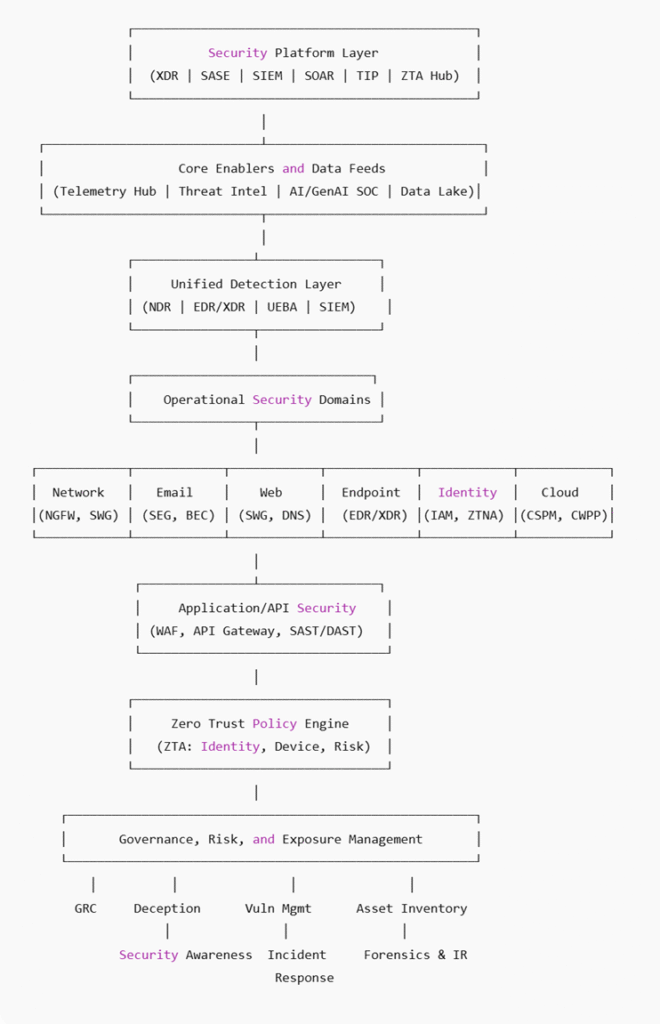
1. Security Platform Layer. This is the centralized control plane that integrates all security technologies. This layer manages orchestration, analytics, and visibility.
→ Orchestration, automation, policy control
2. Core Enablers & Data Feeds. This is the foundation of detection, enrichment, and analytic. Feeds the detection engines and AI models for analytics.
→ Telemetry, AI, Threat Intel, Logging
3. Unified Detection Layer. This is the layer where threats are detected and prioritized. Turns raw data and signals into prioritized security detections and context.
→ EDR, UEBA, SIEM, NDR
4. Operational Security Domains. Each of these domains contributes unique telemetry and requires domain-specific controls and policies. Protects software layer from exploitation and ensures DevSecOps integration.
→ Network, Email, Web, Endpoint, Identity, Cloud
5. Application/API Security. Focuses on securing custom code and public/external apps. Protects software layer from exploitation and ensures DevSecOps integration.
→ WAF, SAST/DAST, Gateway
6. Zero Trust Policy Engine – Implements Zero Trust Access principles. Eliminates implicit trust across all users, devices, and services.
→ Identity + Device + Context-based Access Control
7. Governance / Risk / Response. This layer handles risk reduction, compliance, and incident lifecycle. Prevent, detect, and respond to breaches while maintaining compliance posture.
→ GRC, Deception, Vuln Mgmt, Security Awareness, IR
Cybersecurity Architecture Executive Summary
Overview
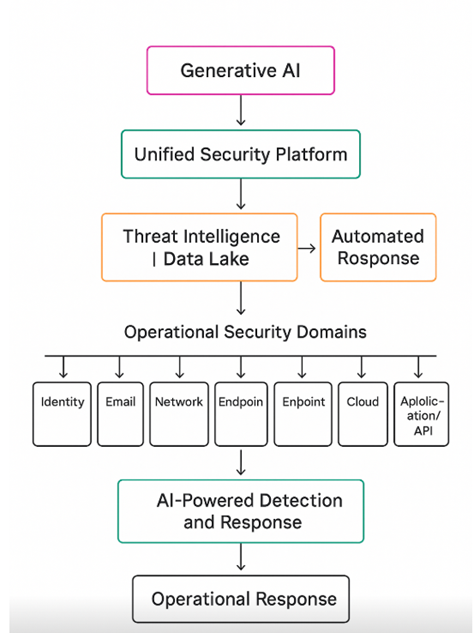
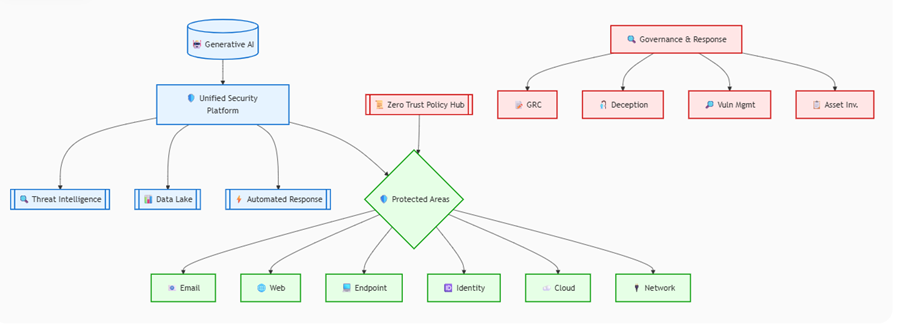
Modern organizations face an increasingly complex threat landscape that requires a comprehensive, layered approach to cybersecurity. This architecture represents a strategic framework designed to protect organizational assets through multiple interconnected security layers, each serving a specific purpose while working together to create a robust defense system.
The architecture follows a “defense in depth” philosophy, where multiple security controls work in concert to prevent, detect, and respond to threats. Rather than relying on a single security solution, this approach ensures that if one layer is compromised, additional layers continue to provide protection.
Architecture Components
Step 1: Core Enablers and Data Feeds – The Intelligence Collectors
The Core Enablers layer serves as the foundation by collecting raw data from across the organization and external sources. This layer “watches” and stores information but doesn’t make judgments about what it sees:
- Telemetry Hub: Continuously collects security data from all systems across the organization – login attempts, file access, network connections, and system changes.
- Threat Intelligence: Gathers external information about current attack methods, known malicious IP addresses, and emerging vulnerabilities from global security sources.
- Artificial Intelligence and Generative AI: Enriches raw data with context and additional analysis, helping to identify patterns and anomalies that might otherwise be missed.
Example: This layer collects login logs showing a user accessed the system from Nigeria at 3am, device data indicating an unknown laptop, and threat intelligence feeds showing recent attacks from Nigerian IP addresses.
Step 2: Unified Detection Layer – The Analysis Engine
The Unified Detection Layer takes the raw data from Step 1 and analyzes it to identify potential threats. This layer “thinks” by applying rules, behavioral models, and baselines to determine if something is wrong:
- Security Operations Center (SOC): The centralized team that monitors alerts, investigates incidents, and coordinates responses using advanced analytics and human expertise.
- Network Detection and Response (NDR): Analyzes network traffic patterns to identify suspicious activities, unauthorized access attempts, and data exfiltration.
- Advanced Detection and Response (ADR/XDR): Correlates events across endpoints, networks, and cloud environments to detect sophisticated, multi-stage attacks.
- Security Information and Event Management (SIEM): Applies correlation rules and behavioral analytics to identify potential security incidents from aggregated log data.
Example: This layer analyzes the Nigerian login, compares it to the user’s normal behavior (usually logs in from London during business hours), and flags this as a high-risk anomaly requiring immediate attention.
Step 3: Security Platform Layer – The Response Orchestrator
The Security Platform Layer acts on alerts from the Detection Layer, orchestrating workflows and automating responses. This layer “responds” by deciding what actions to take and executing them:
- Extended Detection and Response (XDR) Platform: Coordinates response actions across multiple security tools and domains, ensuring comprehensive threat containment.
- Security Information and Event Management (SIEM) with Security Orchestration, Automation and Response (SOAR): Automates incident response workflows, reducing response time and ensuring consistent actions.
- Threat Intelligence Platform (TIP): Provides context for response decisions and updates threat indicators based on new incidents.
- Zero Trust Architecture Hub: Dynamically adjusts access policies based on detected threats and risk levels.
Example: This layer receives the anomaly alert, automatically disables the user account, blocks the Nigerian IP address, alerts the security analyst, and logs the incident in the security dashboard for investigation.
Operational Security Domains – The Protection Layers
This layer represents the specific areas where security controls are implemented:
Network Security: Traditional perimeter defenses including firewalls and intrusion prevention systems that control traffic flow and block known threats.
Email Security: Secure Email Gateways (SEG) that filter malicious content, prevent phishing attacks, and protect against email-based threats.
Web Security: Web Security Gateways (SEG) that control internet access, block malicious websites, and prevent data exfiltration through web channels.
Endpoint Security: Protection for individual devices including laptops, desktops, and mobile devices through advanced antivirus, device control, and behavioral monitoring.
Cloud Security: Cloud Security Posture Management (CSPM) and Cloud Workload Protection Platforms (CWPP) that secure cloud infrastructure and applications.
Application and API Security – The Development Shield
This layer focuses on securing the applications and services that drive business operations:
Build Phase Security: Includes Static Application Security Testing (SAST), Software Composition Analysis (SCA), and Application Security Configuration Management (ASCM) to identify vulnerabilities before applications are deployed.
Runtime Security: Web Application Firewalls (WAF), Runtime Application Self-Protection (RASP), and API Gateways that protect applications while they’re running and serving users.
Zero Trust Policy Engine – The Access Controller
The Zero Trust Policy Engine represents a fundamental shift from traditional security models. Instead of assuming that users and devices inside the network are trustworthy, this system:
- Continuously verifies user identity and device security posture
- Assesses behavioral patterns to identify unusual activities
- Applies risk-based access controls that adapt to changing threat conditions
- Ensures that access privileges are granted on a least-privilege basis
Governance and Risk Management
The foundation of this architecture includes comprehensive Governance, Risk, and Exposure Management capabilities:
Security Posture Awareness: Continuous monitoring and assessment of the organization’s overall security health, identifying gaps and areas for improvement.
Governance, Risk, and Compliance (GRC): Frameworks and processes that ensure security activities align with business objectives and regulatory requirements.
Vulnerability Management: Systematic identification, assessment, and remediation of security vulnerabilities across all systems and applications.
Asset Risk Management: Understanding and managing the security risks associated with all organizational assets, from critical servers to individual employee devices.
Deception Management: Advanced techniques that create decoy systems and data to mislead attackers and provide early warning of breach attempts.
Strategic Benefits
This architecture provides several key advantages:
Comprehensive Coverage: No single point of failure exists, as multiple layers provide overlapping protection across all attack vectors.
Adaptive Defense: The system learns from each incident and adapts its defenses accordingly, becoming more effective over time.
Operational Efficiency: Automation and orchestration reduce the burden on security teams while improving response times and consistency.
Business Enablement: Rather than simply blocking activities, the architecture provides secure pathways for legitimate business operations.
Regulatory Compliance: Built-in compliance monitoring and reporting capabilities help meet various regulatory requirements.
Implementation Considerations
Successfully implementing this architecture requires careful planning and phased deployment. Organizations should prioritize components based on their specific risk profile and business requirements. The modular nature of this architecture allows for incremental implementation, enabling organizations to build their security capabilities over time while maintaining operational continuity.
Regular assessment and continuous improvement are essential, as the threat landscape evolves rapidly. This architecture provides the foundation for a mature cybersecurity program that can adapt to new challenges while maintaining robust protection for organizational assets and operations.
